Memaparkan catatan dengan label Yii2 Framework. Papar semua catatan
Memaparkan catatan dengan label Yii2 Framework. Papar semua catatan
For Yii2 basic template the database connection can be found at config\db.php

.
For Yii2 advanced the database connection can be found at common\config\main-local.php


.
For Yii2 advanced the database connection can be found at common\config\main-local.php

Database Connection Yii2

Step 1: Open shell XAMPP for Window

composer require 2amigos/yii2-date-picker-widget:~1.0
Open this link https://github.com/2amigos/yii2-date-picker-widget and see at the usage .
Furthermore there is another of the widget
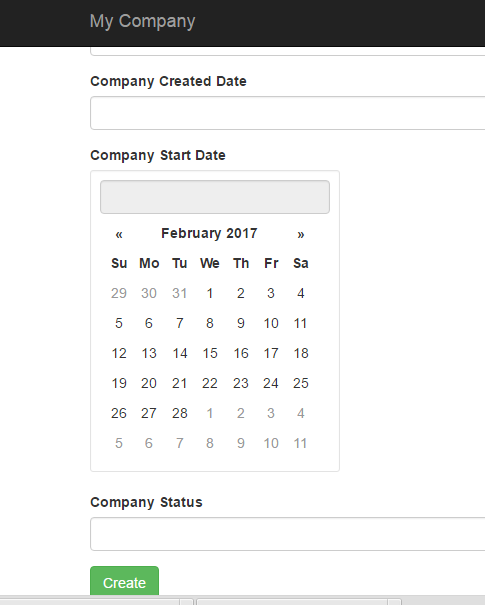

DatePicker in the Filter Field Gridview - Yii2 Framework

Yii2 Framework CRUD
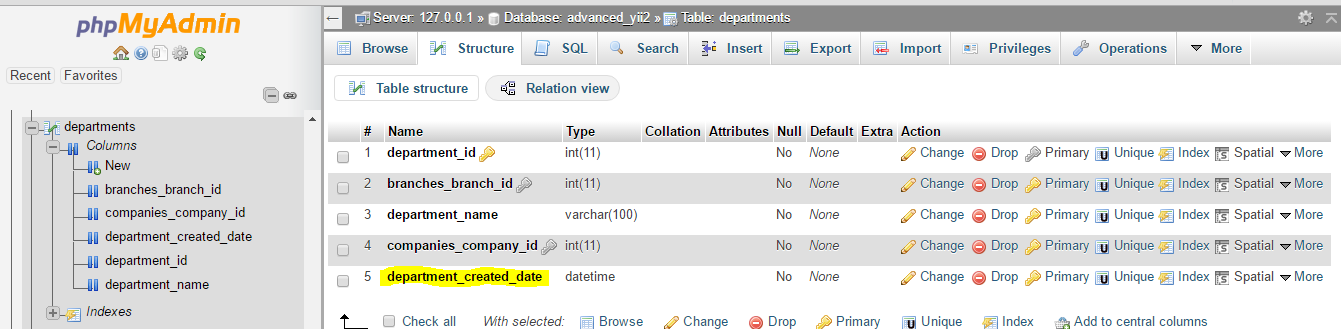
In this form, we don't put a department created date field but actually we already create one in database table of department.
phpMyAdmin
In the database the structure of department_created_date is type of DATATIME .

The time is automatically inserted by timer, not manually by user .
This is the source code .
Automatic Assign Current Date and Time after Create [ Yii2 Framework]

1. Open Xampp Control Panel
2. Change directory : cd htdocs
3: Install using composer : composer create-project yiisoft/yii2-app-advanced advanced 2.0.9
4. Change directory : cd advanced
4. Change directory : cd advanced

5. Yii Application Initialiazation : php init
6. Choose Development : 0

7. Php yii migration : php yiii migrate
Installing Yii2 Advance Application Template + Xampp for Windows
This cmd is the place you should place those source code . I waste so much time paste at another place . ok .. LOL..
1. Open xampp
2. Click Shell

Install via Composer
If you do not have Composer, you may install it by following the instructions at getcomposer.org.
You can then install this project template using the following command:
php composer.phar global require "fxp/composer-asset-plugin:~1.1.1"
php composer.phar create-project --prefer-dist --stability=dev yiisoft/yii2-app-basic basic
Now you should be able to access the application through the following URL, assuming
basic is the directory directly under the Web root.http://localhost/basic/web/Yii2 dengan Composer
Langgan:
Catatan
(
Atom
)